 Context
Plan ChatGPT Ads with evidence, not guesswork.
Connect ContextHint to Codex or Claude. It turns the product brief already in your workspace into a context hint, validates the conversations it should reach, and shows the advertiser and market evidence behind the recommendation.
A context hint is the natural-language instruction that tells ChatGPT which conversations your ad belongs in.
Use the complete MCP while we build it with early users.
No card. Sign in once to connect Codex or Claude, see your usage, and keep the same account when early access evolves.
Connect and try it ↓Account, usage and API keys →Ask for the targeting decision, not the tool.
Turn this product brief into a context hint and show the prompts behind it.
Which advertisers are most similar to this product?
How does ClickUp appear to target buyers across different markets?
“Build a targeting plan for project operations leaders at professional services firms.”
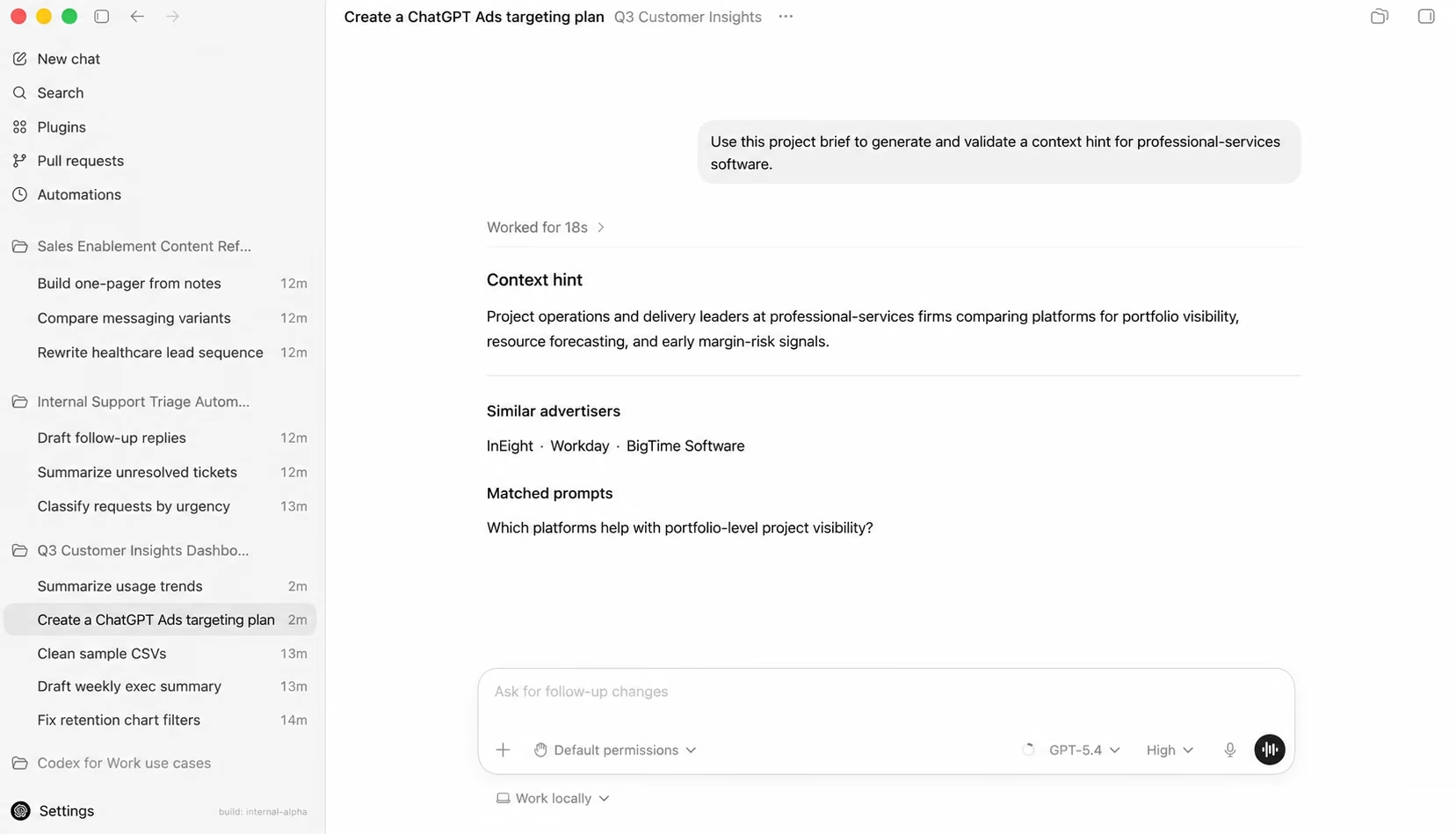
Project operations and delivery leaders comparing platforms for portfolio visibility, resource forecasting, and early margin-risk signals.
Move from product context to campaign evidence in one conversation.
The connector gives Codex or Claude a specialized targeting and market-intelligence layer. Ask naturally from the project you are already working in; the MCP returns the evidence needed for the next decision.
Generate a campaign-ready hint
Turn the product, audience hypothesis, and differentiators into a primary context hint, an alternate angle, and a structured targeting breakdown.
Validate the conversations it reaches
Inspect matched prompts, niche fit, specificity, intent clarity, commercial relevance, audience clarity, and vagueness risk before using the hint.
Research the market around it
Find semantically similar advertisers, map a niche's advertiser and intent landscape, or inspect a brand's inferred targeting across markets.
The context hint is only the first line of the answer.
We sent the MCP a professional-services software brief. It returned the targeting instruction, then showed the market evidence and quality checks your agent can use to evaluate it.
- ✓ Primary and alternate context hints
- ✓ Audience, intent, topic, niche and quality signals
- ✓ Target prompts, similar advertisers and competitor patterns
Use the brief in this workspace to build the targeting plan for project-operations leaders at professional-services firms.
Project operations and delivery leaders at mid-market professional-services firms comparing platforms for portfolio visibility, resource forecasting, and early margin-risk signals.
Your agent gets evidence it can inspect, compare, and act on.
Click through to the evidence
Advertisers and prompts return with ChatGPT Ads Library links, so your agent can preserve a path back to the captured ads behind the recommendation.
Correct a poor niche match
The MCP gives the client enough guidance to compare the returned prompts with your buyer and re-run against a better available niche when the fit is clearly wrong.
Separate observation from inference
Competitor hints are labeled as reverse-engineered patterns from observed ads, never as literal targeting copied from a private ad account.
Use only the context you choose
Codex or Claude selects the relevant product context for the request. ContextHint does not independently browse the rest of your workspace.
Give your existing agent a targeting research layer.
Add the MCP once, then ask from any workspace. Codex or Claude can pass the relevant brief, call the appropriate ContextHint capability, and synthesize the result inside the conversation.
Add it from the app.
No configuration-file editing required. Add the remote endpoint, authorize your free ContextHint account, and ask from the project that already contains your brief.
- 01Open MCP servers
In the Codex app, open Settings, select MCP servers, then choose Add server.
- 02Enter the connection
Name it ContextHint, choose Streamable HTTP, and paste the MCP URL.
- 03Authorize and verify
Save the server, sign in to ContextHint when prompted, then restart and confirm the server is connected.
Using a CLI without OAuth? Create a personal bearer key in your MCP account.
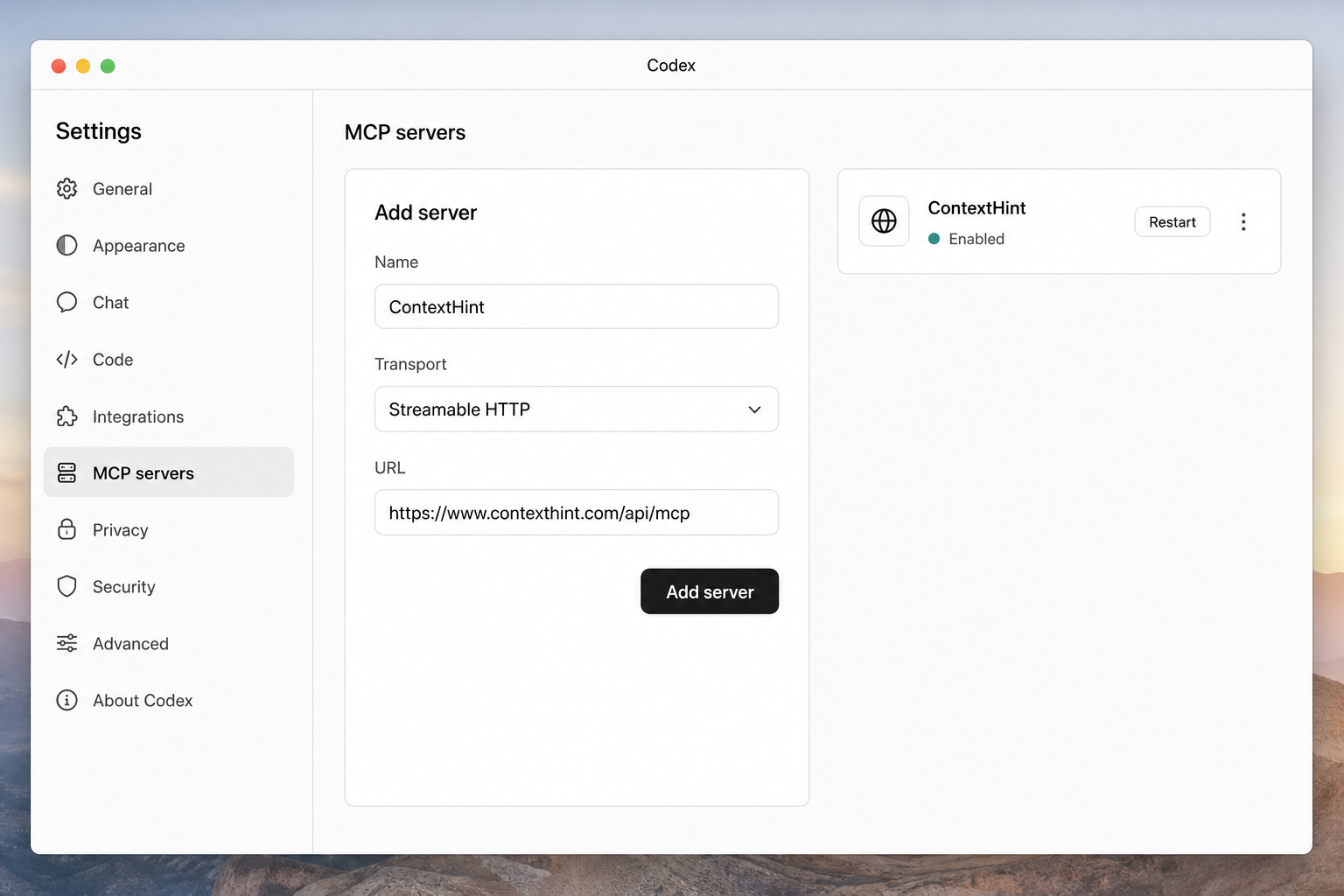
https://www.contexthint.com/api/mcpThe ChatGPT desktop app, Codex CLI, and IDE extension share this MCP configuration on the same Codex host.
What the early-access MCP is designed to handle.
The website generator is useful for a single brief. The MCP is the repeatable workflow for generation, validation, and market research inside Codex or Claude.
Try one generation on the website →What can the ContextHint MCP help me do?+
It can generate and validate a context hint, find similar advertisers, map the advertisers and buyer intents in a niche, inspect a specific advertiser's cross-niche targeting profile, and answer context-hint strategy questions inside your AI client.
What comes back from a full generation?+
A primary and alternate hint; targeting score; audience, intent, topic and constraint; quality signals; matched prompts; similar advertisers; and inferred competitor hints, with evidence links where available.
Why use it if Codex or Claude can already write copy?+
The MCP adds retrieval and scoring against captured ChatGPT ads, prompt matches, and inferred advertiser patterns. Your agent can use that evidence to validate or correct the answer instead of judging a plausible sentence by taste alone.
Can I research a market without generating a hint?+
Yes. Ask for semantically similar advertisers, a niche's advertiser and intent landscape, or a real advertiser's inferred targeting profile. Those research workflows are separate from full hint generation.
What exactly is the hint the MCP generates?+
A context hint is descriptive text attached to a ChatGPT ad group. It tells OpenAI the conversations, needs, topics, products, or situations where the ads in that group may be relevant. Unlike an exact-match keyword, it guides matching by meaning and does not guarantee delivery in a particular conversation.
Does ContextHint read my whole workspace?+
No. Your AI client selects the relevant context for the request. The ContextHint server does not independently open or browse your project files.
Is advertiser targeting copied from private ad accounts?+
No. Advertiser and competitor hints are inferred from captured ads and associated prompts. They are evidence-backed reconstructions, not literal private targeting settings.
How much does early access cost?+
ContextHint MCP is free during early access. Connect the production endpoint without a card, sign in once to keep usage attached to your account, and share feedback that can help shape the product.
Let your agent generate, validate, and investigate the targeting.
Connect ContextHint during early access. Then ask from the workspace that already knows the product and get the campaign plan, prompt evidence, and advertiser intelligence back in-thread.
Connect ContextHint ↑